SQL execution order is the sequence in which SQL processes the clauses of a query internally. It defines which clauses runs first, which runs next and which runs last before the final result is returned to you.
When you write a SQL query, you write it in a specific order – SELECT, FROM, WHERE, GROUP BY and so on. This is called the written order or syntax order. It is the order SQL expects you to follow when writing a query.
But SQL does not execute your query in the same order as you write it. Internally, SQL follows its own execution order. It is a fixed sequence of steps it uses to process your query and return the result.
Understanding the execution order of a SQL query will help you write better queries, avoid common errors and debug problems much faster.
The order you write a query:
SELECT customer_name, SUM(price)
FROM orders
WHERE status = 'delivered'
GROUP BY customer_name
HAVING SUM(price) > 1000
ORDER BY SUM(price) DESC
LIMIT 3;
You naturally read it top to bottom. SELECT first, then FROM, then WHERE and so on. So it feels like SQL runs it in that order too. But it does not.
The order SQL actually runs it:
Here is the actual order SQL executes the query:
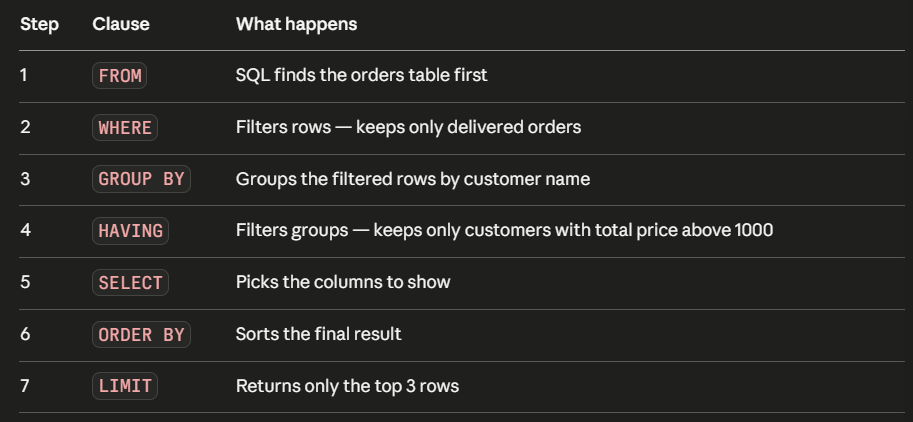
SQL execution starts with FROM, not SELECT. It first needs to know which table it is working with, before it can do anything else.
Let’s walk through it step by step
We are using the orders table:
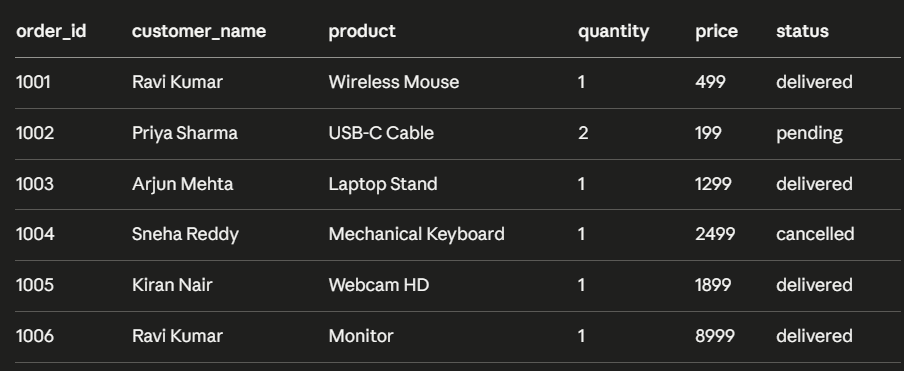
Now let’s run this query and follow every step:
SELECT customer_name, SUM(price)
FROM orders
WHERE status = 'delivered'
GROUP BY customer_name
HAVING SUM(price) > 1000
ORDER BY SUM(price) DESC
LIMIT 3;- FROM
SQL goes to the orders table. All 6 rows are loaded
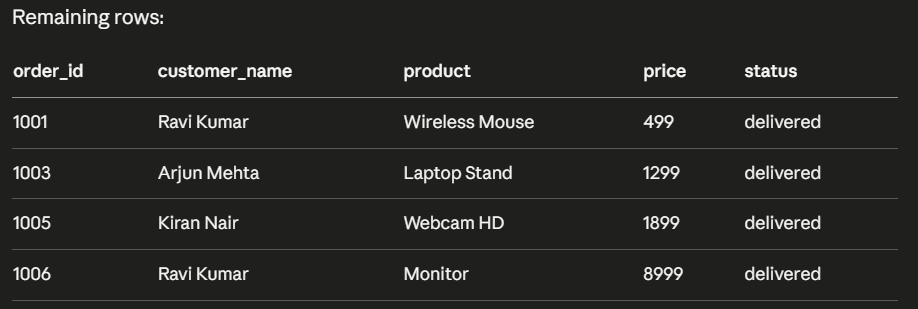
- WHERE
SQL filters rows where status is delivered. Three rows are removed (Priya Sharma (pending) and Sneha Reddy (cancelled) are gone)
- GROUP BY
SQL groups the remaining rows by customer name. Ravi Kumar has two orders so they are grouped together.

- HAVING
SQL filters the groups. Only groups where the total price is above 1000 are kept. All three pass in this case.

- SELECT
SQL now picks the columns you asked for, which are customer_name and SUM(price).
- ORDER BY
SQL sorts the result by SUM(price) descending, showing the highest first

- LIMIT
SQL returns only the top 3 rows. In this case all three are returned as we have only three groups.
Why does this execution order matter?
Now that you know the execution order, a lot of confusing SQL errors will start to make sense.
Mistake 1 – Using a column alias in WHERE
SELECT SUM(price) AS total_revenue
FROM orders
WHERE total_revenue > 1000;
This throws an error. Why? Because WHERE runs before SELECT. The alias total_revenue is defined in SELECT but WHERE runs before SELECT even executes. The database has no idea what total_revenue is at that point.
The fix is to use HAVING instead:
SELECT customer_name, SUM(price) AS total_revenue
FROM orders
GROUP BY customer_name
HAVING SUM(price) > 1000;
Mistake 2 – Using WHERE to filter aggregates
SELECT customer_name, SUM(price)
FROM orders
WHERE SUM(price) > 1000
GROUP BY customer_name;
This also throws an error. WHERE filters individual rows before grouping happens. It does not know about aggregates like SUM() yet. Aggregates are calculated in GROUP BY — which comes after WHERE.
Use HAVING to filter aggregates:
SELECT customer_name, SUM(price)
FROM orders
GROUP BY customer_name
HAVING SUM(price) > 1000;
The simple rule to remember
- WHERE filter rows, so use it before grouping on individual column values.
- HAVING filter groups, so use it after grouping on aggregate values.