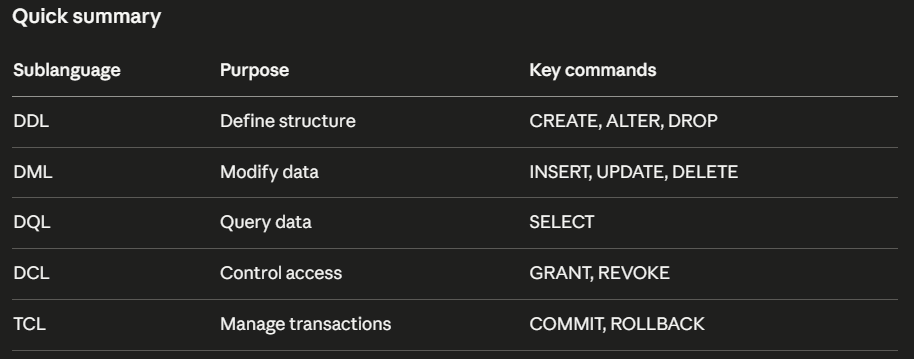
SQL commands are grouped into five categories based on what they do. These categories are called sublanguages.
Think of it like a warehouse. Some workers build the shelves. Some put items on the shelves. Some fetch items. Some control who enters. Some handle approvals and rejections. SQL sublanguages work the same way, each category has its own job.
DDL – Data Definition Language
DDL is about building and changing the structure of your database. Before you can store any data, you need a table. Before you can query anything, that table needs columns. DDL is what you use to create that structure.
Imagine you are building the orders table from scratch. You need to define what columns it will have and what types of data each column holds. That is a DDL operation.
CREATE TABLE orders (
    order_id INT,
    customer_name VARCHAR(100),
    product VARCHAR(100),
    quantity INT,
    price DECIMAL(10,2),
    status VARCHAR(50)
);
Later you realise you forgot to add an order date column. You do not need to delete and recreate the table. You just alter the table by adding a column.
ALTER TABLE orders ADD order_date DATE;
If you want to delete the table completely and remove it from the database, you need to drop it.
DROP TABLE orders;
DDL commands: CREATE, ALTER, DROP, TRUNCATE
DML – Data Manipulation Language
Once the table structure is ready, you need to fill it with data. And over time, you will need to update that data or remove records that are no longer needed. This is what DML is for.
Think of DML as the day to day operations on your data. A new order comes in, you insert it. A customer cancels, you update the status. A test record needs to be removed, you delete it.
A new order just came in from Divya Nair. You insert it into the orders table.
INSERT INTO orders (order_id, customer_name, product, quantity, price, status)
VALUES (1006, 'Divya Nair', 'Monitor', 1, 8999, 'pending');
Her order just got shipped. You update the status.
UPDATE orders SET status = 'delivered' WHERE order_id = 1006;
A duplicate test record needs to be removed
DELETE FROM orders WHERE order_id = 1006;
DML commands: INSERT, UPDATE, DELETE, MERGE
DQL – Data Query Language
DQL is the most used category in SQl. It is used to retrieve data from tables. Every time you fetch data from a database, you are writing a DQL query.
As a data analyst this is where you will spend most of your time. Your manager asks how many orders were delivered last month. Your dashboard needs total revenue by product. A business question comes in and you need to pull the right data to answer it. All of that is DQL.
Show all delivered orders:
SELECT * FROM orders WHERE status = 'delivered';
Find the total revenue across all orders:
SELECT SUM(price) FROM orders;
Show customer names and products sorted by price, highest first:
SELECT customer_name, product FROM orders ORDER BY price DESC;
DQL command: SELECT
DCL – Data Control Language
Not everyone in a company should have access to every table. A junior analyst should be able to delete records. An external contractor should not be able to see salary data. DCL is what database administrators use to control who can access what.
As a data analyst you will rarely write DCL commands yourself. But you will encounter situations where you try to query a table and get a permission error. That is DCL at work, someone has not granted you access yet.
Giving an analyst permission to read the orders table:
GRANT SELECT ON orders TO analyst_user;
Removing that permission:
REVOKE SELECT ON orders FROM analyst_user;
DCL commands: GRANT, REVOKE
TCL – Transaction Control Language
Sometimes you need multiple operations to happen together. Either all of them succeed or none of them do. This is called a transaction and TCL is what manages it.
Think about updating orders statuses in bulk at the end of the day. You are updating 50 orders from pending to delivered. Halfway through, something goes wrong. Without TCL, 25 orders are updated and 25 are not, so your data is now inconsistent. With TCL you can roll everything back and start fresh.
You start a transaction, run your updates, and commit only when everything is successful.
BEGIN;

UPDATE orders SET status = 'delivered' WHERE order_id = 1001;
UPDATE orders SET status = 'delivered' WHERE order_id = 1002;
UPDATE orders SET status = 'delivered' WHERE order_id = 1003;

COMMIT;
If something goes wrong before the commit, you roll back and nothing changes.
ROLLBACK;
TCL commands: COMMIT, ROLLBACK, SAVEPOINT